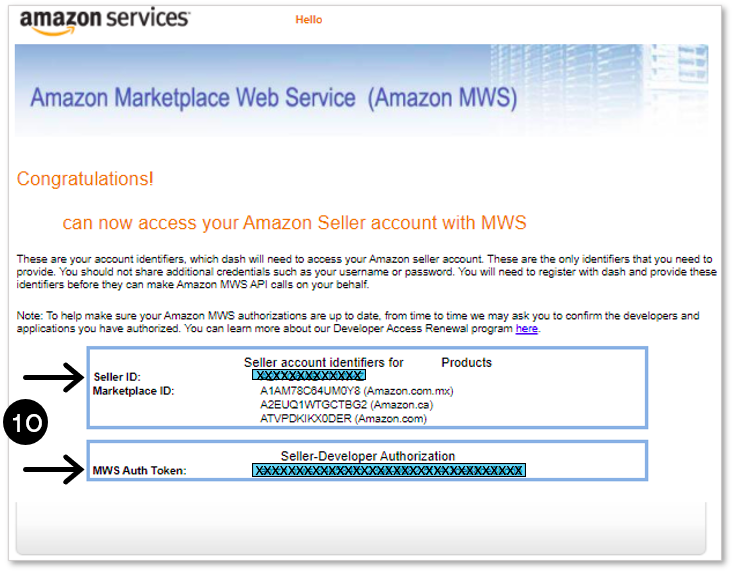
To retrieve your ‘Seller ID’ and ‘MWS Auth Token’ follow these steps:
1. Log into
Seller Central using the
Admin (Primary) account
2. In the upper right-hand corner, click “ SETTINGS”
3. And then select “ USER PERMISSIONS”
2. In the upper right-hand corner, click “ SETTINGS”
3. And then select “ USER PERMISSIONS”

4. You will be redirected to the ‘User Permissions’ page, and from here scroll down to the ‘Third party developer and Apps’ section, and click “
VISIT MANAGE YOUR APPS”

5. Now, within the ‘Manage your apps’ page, click “
AUTHORIZE NEW DEVELOPER”

6. From here, enter “
Sellers Arena” as the ‘Developer Name’
7. For the ‘Developer ID’, Amazon assigns developers unique IDs for each region. Based on the account/marketplace you are currently accessing, enter the corresponding ‘Sellers Arena Developer ID’. NOTE: to add additional marketplaces, you will need to repeat this process.
a) North America (US/Canada/Mexico): “ 546615959819”
8. Click “ NEXT”
7. For the ‘Developer ID’, Amazon assigns developers unique IDs for each region. Based on the account/marketplace you are currently accessing, enter the corresponding ‘Sellers Arena Developer ID’. NOTE: to add additional marketplaces, you will need to repeat this process.
a) North America (US/Canada/Mexico): “ 546615959819”
8. Click “ NEXT”

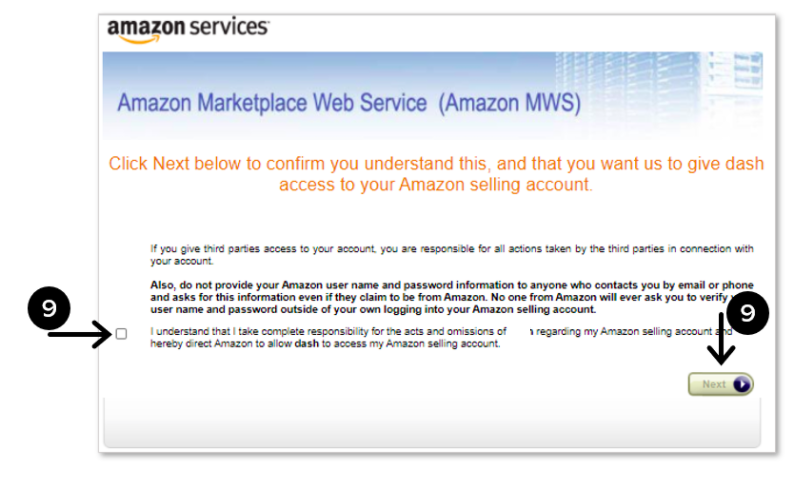
9. You’ll be redirected to a confirmation page where you will “
CHECK THE BOX” to confirm access and click “
NEXT”
10.
IMPORTANT: The page will refresh to show your ‘
Seller ID’ and our ‘
MWS Auth Token’. This is the information we will need.
Copy these two fields and/or take a screenshot and send them our way!
Copy these two fields and/or take a screenshot and send them our way!